Everything you gain the moment you deploy MFA 2.0.
AuthN by IDEE delivers results from day one — for security, for compliance, and for the people who depend on it.
Your organisation already has MFA. OTPs get intercepted. Push notifications get approved by attackers. Sessions get hijacked. The problem isn't that you lack authentication — it's that the authentication you have can be bypassed.
Stops all phishing. Stops all MFA bypass.
No credentials to steal. No session to intercept.
No way in.
AuthN strips authentication down to its cryptographic core. No shared secrets. No central database of passwords. No decision a human can get wrong.
Every element of legacy authentication that could be exploited, lost, or forgotten — removed. What's left is just you and your device.
AuthN secures every access point across your organisation — without replacing a single system you already run (except your legacy MFA).
AuthN by IDEE doesn't make attacks harder to pull off. It removes the conditions that make them possible in the first place. This is MFA 2.0 — next generation MFA.
Can you unlock your device? Then you can use AuthN by IDEE. We made it so simple that both TikTok queens and flip-phone fans can use it with ease.
in a few seconds available for any device made after 2016.
in a couple of seconds — MFA 2.0 protection delivered everytime.
Screenshot walkthroughs. The interactive walkthroughs below show both user journeys on real screens — first certificate-based device registration, then passwordless sign-in to Microsoft 365. Use the arrows or dots to step through; account details are redacted.
The certificate-based path (Path A), captured from the very first sign-in to a registered device.
The user starts at the familiar Microsoft sign-in page and enters their work email.
Microsoft recognizes the organization and forwards the user to AuthN by IDEE.
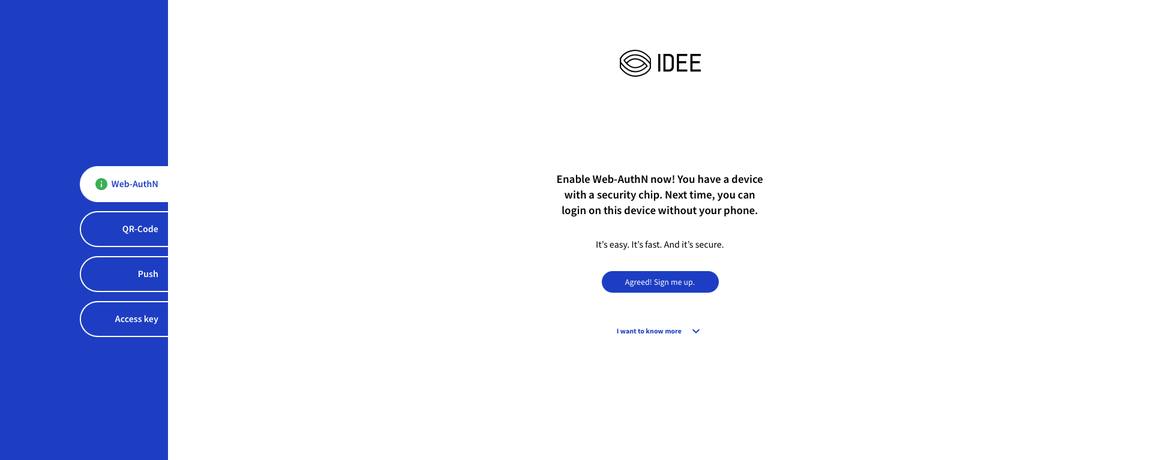
The device has a security chip, so IDEE offers Web-AuthN. One click: “Agreed! Sign me up.”
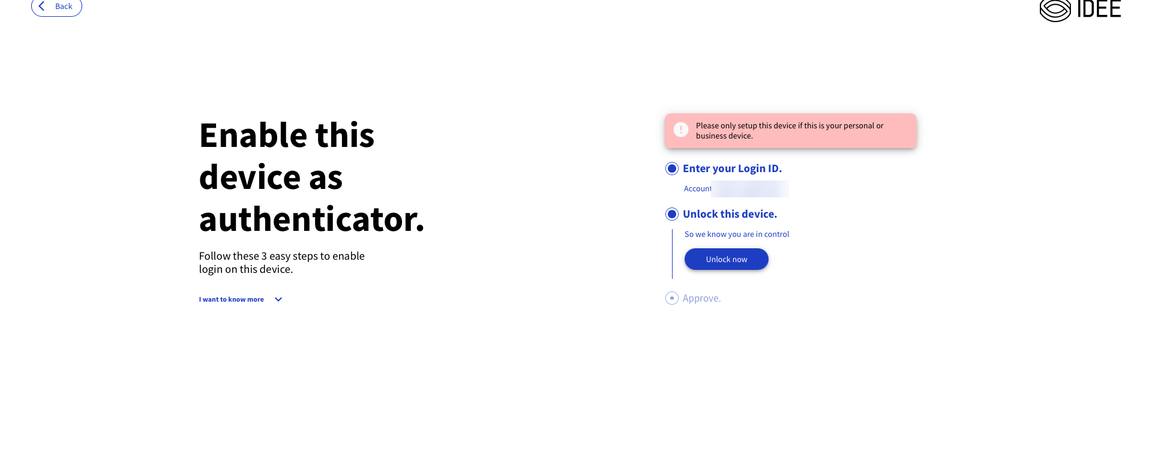
The user certificate identifies the account — unlocking the device shows the user is in control.
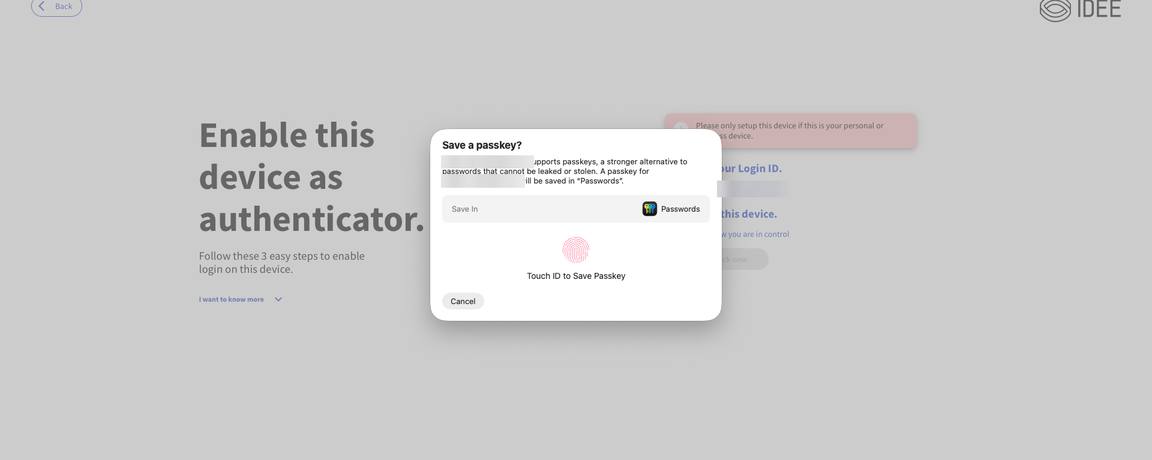
Touch ID (or the device PIN) stores the passkey securely on the device.
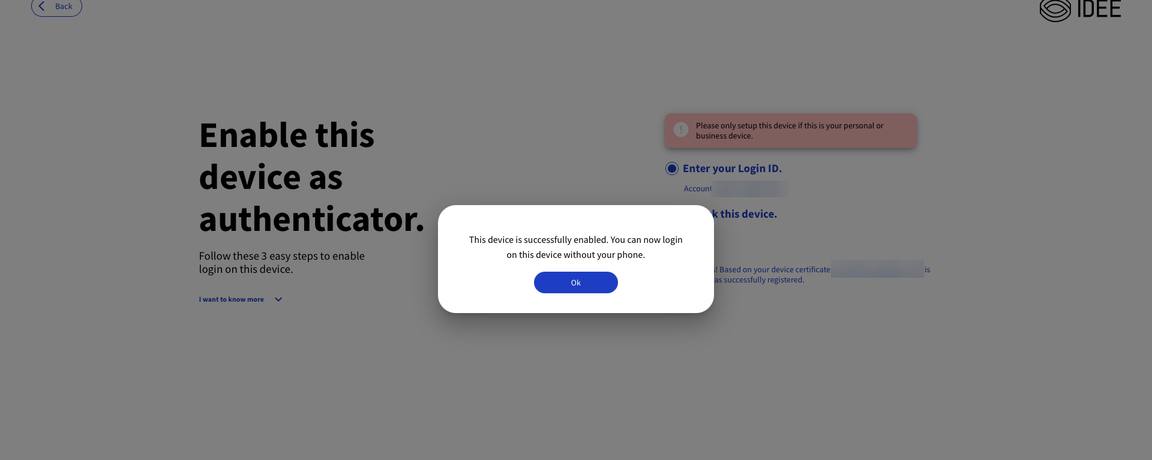
From now on this device is the authenticator. No password, no phone needed.
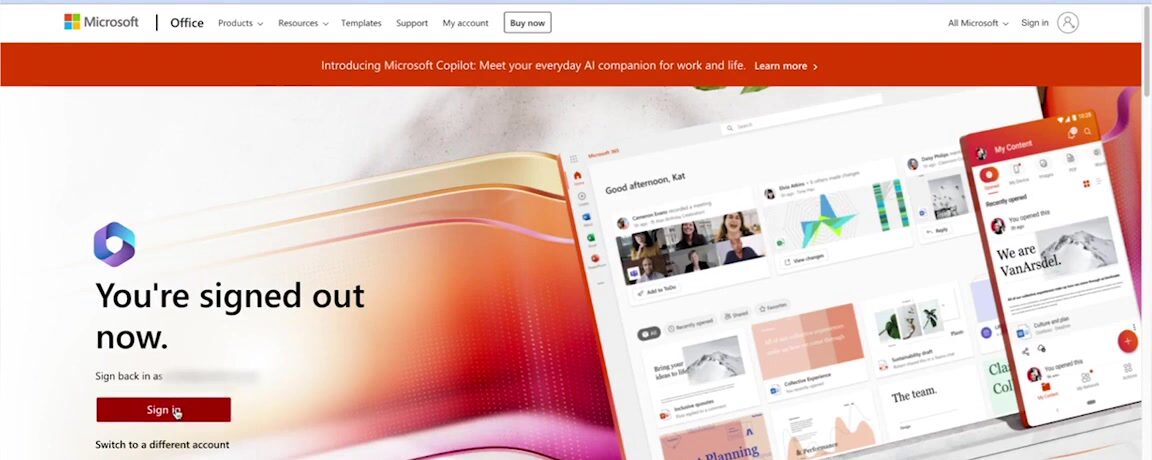
Step through the actual screens a user sees — from the Microsoft sign-in page to the open workspace.
Start from any signed-out Microsoft 365 page — exactly where every login begins.
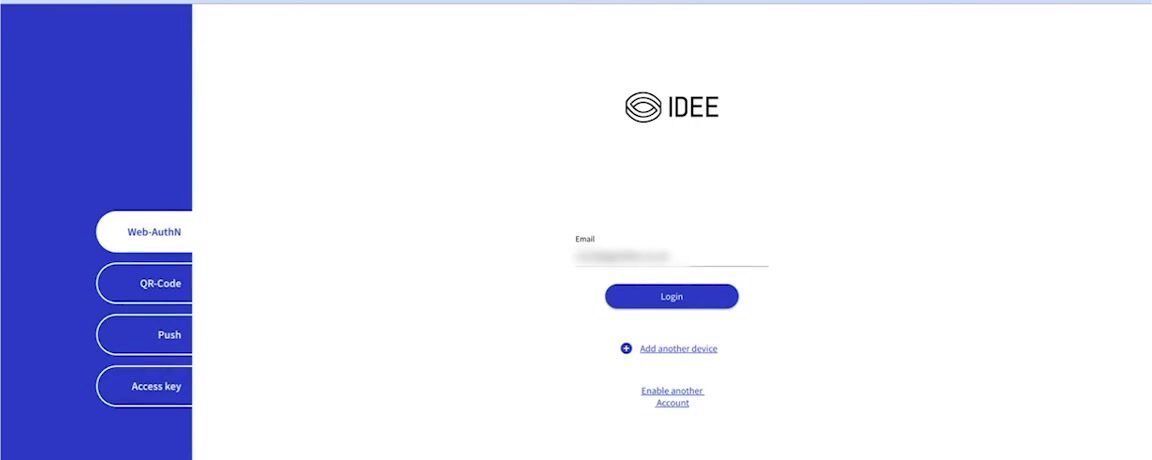
You’re redirected to AuthN by IDEE. No username to remember, no password to type — just click Login.
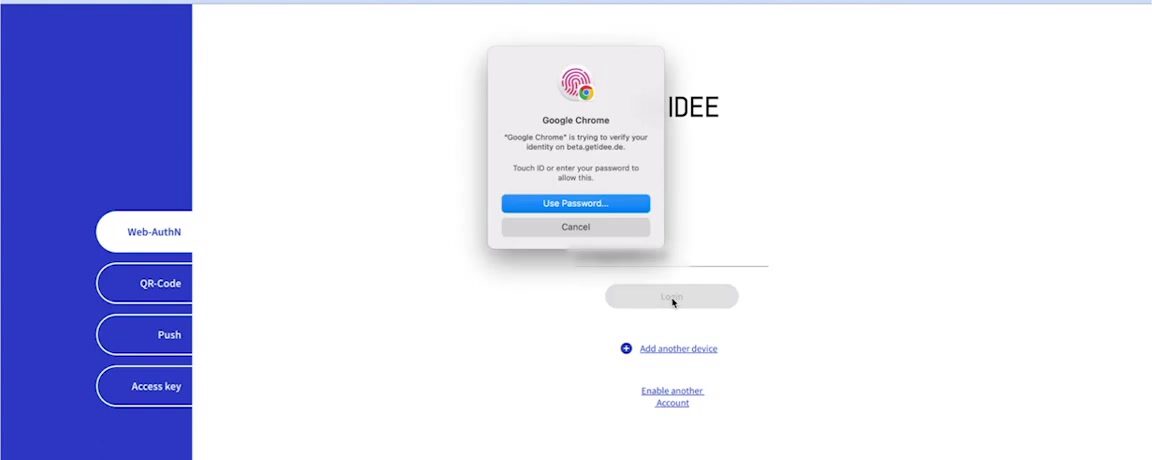
Confirm with Touch ID (or your device PIN). That’s the entire MFA — phishing-proof by design.
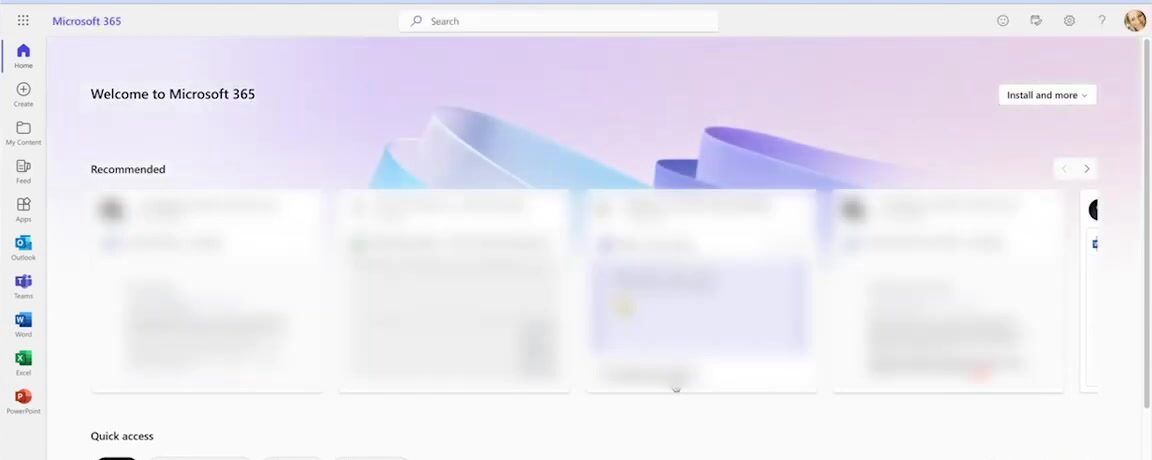
Straight into Microsoft 365. Password-free, same-device, done in seconds.
Then you can deploy AuthN by IDEE. No-code integration. No consultants. No project plan. Just connect to your existing stack and go.
Whether your workforce uses company-issued hardware or their own personal devices. AuthN works without installing any hardware or software. Supported on Windows, macOS, iPadOS, iOS, Android, Linux, and much more. This is MFA 2.0.
AuthN by IDEE supports the protocols and platforms your infrastructure depends on. No rip-and-replace required.
AuthN integrates with tens of thousands of apps in minutes. Not sure if your application is covered? Let's check.
Let's check →Same authentication strength — the difference is whether enrollment needs a phishable bridge.
Why resistant, not proof
| WebAuthn | MFA 2.0 | |
|---|---|---|
| Same-platform enrollment | Native passkey | Native passkey |
|
Cross-ecosystem enrollment
Microsoft
Apple
Google
Any other OS
|
Falls back to an authenticator | Transitive trust |
| Bridge factor | OTP / Push | Device · Certificate · Admin |
| Phishable? | Yes | No |
Same authentication strength — the difference is whether enrollment needs a phishable factor.
Cross-ecosystem device enrollment
| From → To | WebAuthn | MFA 2.0 |
|---|---|---|
| Windows → Apple iOS · iPadOS · Mac | OTP / Push | ✓ Transitive trust |
| Apple iOS · iPadOS · Mac → Windows | OTP / Push | ✓ Transitive trust |
| Windows → Android | OTP / Push | ✓ Transitive trust |
| Android → Windows | OTP / Push | ✓ Transitive trust |
| Apple iOS · iPadOS · Mac → Android | OTP / Push | ✓ Transitive trust |
| Android → Apple iOS · iPadOS · Mac | OTP / Push | ✓ Transitive trust |
Same authentication strength in both — WebAuthn falls back to a phishable factor to bridge platforms; MFA 2.0 uses transitive trust (device-to-device, certificate, or admin).
Transitive trust · three paths
The new device presents an installed user certificate — that is all that's needed. Standard on managed devices, and no human is in the loop to manipulate.
Unlock the trusted device, scan a QR code with the new device, unlock it — WebAuthn is set up. Strong, but a user could be convinced to enroll an attacker's device.
An administrator authorises the new device. The most flexible fallback — and the biggest target for social engineering, since an admin can be impersonated or tricked.
AuthN by IDEE delivers results from day one — for security, for compliance, and for the people who depend on it.
From overnight breach recovery to enterprise-wide rollouts — AuthN by IDEE is deployed where failure is not an option.
Requiring a second device to authenticate isn't just inconvenient — for millions of people with disabilities, it's a barrier to access. True MFA 2.0 is secure and inclusive by design.
Picking up a phone, unlocking it, opening an app, and reading a code — all while your primary device is waiting — is not possible for people with tremors, limited dexterity, limb differences, or paralysis. Push notification timeouts make this worse: approve within 30 seconds or start over.
Reading a 6-digit TOTP code from a physical token or a small phone screen is a significant challenge for people with low vision or blindness. Authenticator apps have inconsistent screen reader support. The 30-second expiry window adds time pressure that assistive technology cannot always keep pace with.
Switching attention between two devices, memorising a code, and transcribing it within a time limit is precisely what cognitive disability makes difficult. For people with ADHD, dyslexia, or memory impairments, this multi-step process under time pressure creates anxiety and repeated login failures.
Success Criterion 3.3.8 (Level AA) of WCAG 2.2 — the standard referenced in EU and US accessibility law — states that authentication must not require a cognitive function test unless an alternative is available. Reading a 6-digit code from a second device and transcribing it within 30 seconds is precisely that: a memorisation and transcription task.
Any organisation deploying TOTP-based or second-device MFA as their only authentication option is likely non-compliant with WCAG 2.2 AA — which is the de facto standard in EU and US accessibility enforcement.
In force from 28 June 2025 for new services. Covers e-commerce, banking, telecoms, and electronic identification services. Digital services must meet EN 301 549, which incorporates WCAG and extends accessibility requirements to biometric and authentication interactions.
Section 508 mandates accessible ICT for federal agencies. ADA Title III applies to private businesses — courts have extended it to digital services, with WCAG 2.1 AA as the de facto compliance standard in settlements. Over 2,500 ADA digital accessibility lawsuits were filed in 2024 alone.
The UN Convention on the Rights of Persons with Disabilities obliges signatory states to ensure that persons with disabilities can access information and communication technologies on equal terms. Digital authentication barriers may constitute a rights violation under ratified national law.
Security and inclusion are not in tension. When you remove the second device, you remove the attack surface and the access barrier at the same time.
Talk to our teamYour users can't be phished. Your credentials can't be stolen. And you can be live in minutes.